Text messages
Last updated October 4, 2026
Tune & Tonic lesson alerts are text messages about your music lessons. They are off until you turn them on, they go only to a mobile number you have confirmed, and they are for people 18 or older. We never send marketing or promotional texts.
What we send
Once your number is confirmed, you choose which of these come by text. Each is off until you turn it on.
- A reminder the day before a lesson, an hour before, or both.
- A notice when a lesson is moved or canceled.
- A link to your lesson notes when your teacher publishes them.
Message frequency varies with your lesson schedule. Msg & data rates may apply. We send no texts between 9 pm and 8 am in your time zone; a notice that falls in those hours is not texted, and its email still arrives.
Sample messages
-
Reminder
Tune & Tonic: Reminder, your guitar lesson with Maria Lopez is tomorrow, Thu Oct 8 at 3:00 PM. Details: https://learn.tunetonic.app/schedule Reply STOP to opt out.
-
Lesson moved
Tune & Tonic: Maria Lopez moved your lesson from Thu Oct 8 3:00 PM to Fri Oct 9 4:00 PM. https://learn.tunetonic.app/schedule Reply STOP to opt out.
-
Lesson canceled
Tune & Tonic: Maria Lopez canceled your lesson on Thu Oct 8 at 3:00 PM. https://learn.tunetonic.app/schedule Reply STOP to opt out.
-
Lesson notes ready
Tune & Tonic: Your notes from Thursday's guitar lesson with Maria Lopez are ready: https://learn.tunetonic.app/lessons/8f2c1a Reply STOP to opt out.
How to opt in
- Sign in at learn.tunetonic.app and open Notifications from your Profile page, or from the link at the bottom of any email we send you.
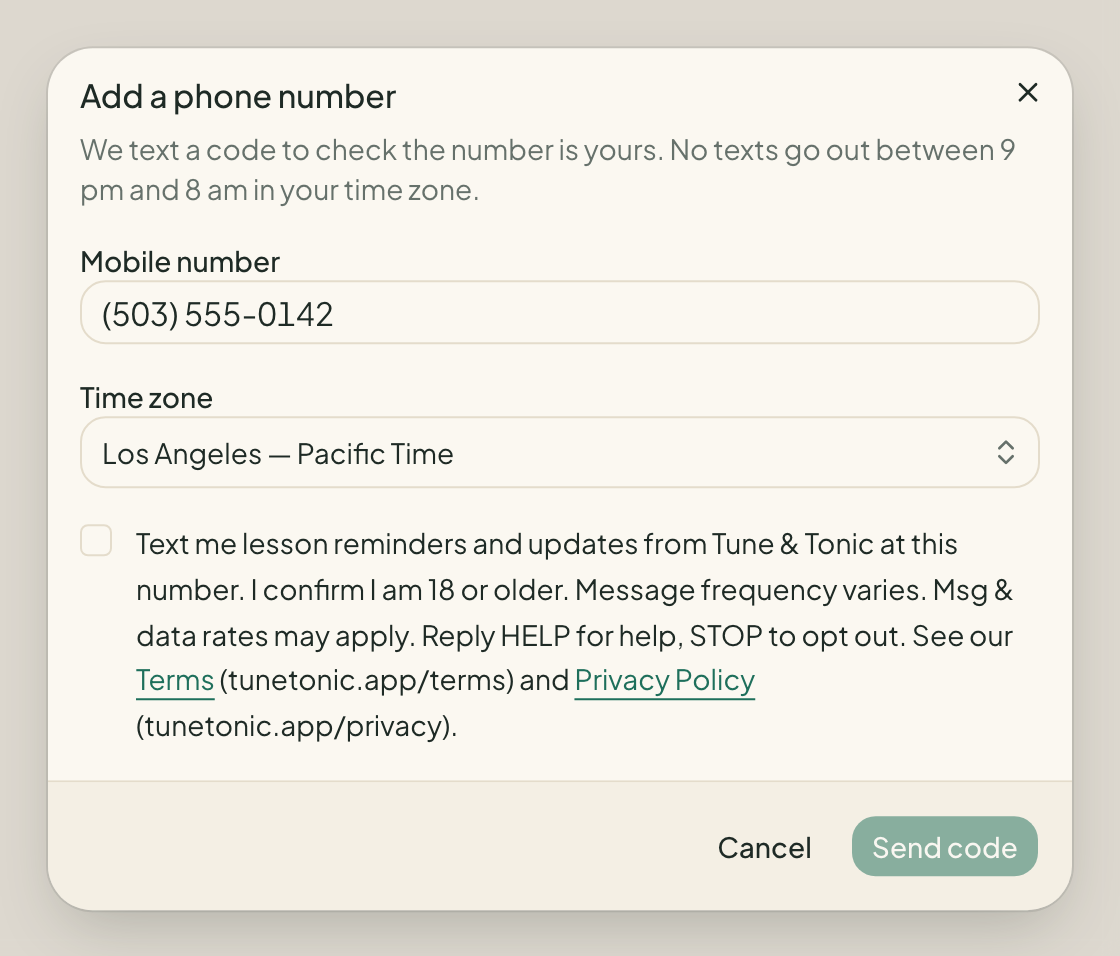
- Under Text messages, choose Add a phone number.
- Enter your US mobile number and check your time zone. Quiet hours follow it.
- Read the consent text below and tick the box. It starts unticked, and nothing is sent until you tick it.
- Choose Send code. We text a one-time code to the number; type it in and choose Verify.
- Every text is still off. Turn on Text beside each notice you want.
If your profile shows you are under 18, the form is not offered. Notices about a child's lessons go to the child's parents, who opt in on their own accounts.
The consent you give
The box you tick says, word for word:
Text me lesson reminders and updates from Tune & Tonic at this number. I confirm I am 18 or older. Message frequency varies. Msg & data rates may apply. Reply HELP for help, STOP to opt out. See our Terms (tunetonic.app/terms) and Privacy Policy (tunetonic.app/privacy).
How to opt out
Reply STOP to any text, or choose Stop texts under Text messages in your notification settings. After a STOP reply we send no more texts to that number until you text START to it. Either way, your emails are unaffected.
Help
Reply HELP to any text, or email support@tunetonic.app. Carriers are not liable for delayed or undelivered messages.
These are the automatic replies to the three keywords:
- STOP: Tune & Tonic: You're unsubscribed and will get no more texts. Reply START to resubscribe.
- START: Tune & Tonic: You're subscribed to lesson texts. Msg frequency varies. Msg & data rates may apply. Reply HELP for help, STOP to opt out.
- HELP: Tune & Tonic lesson alerts. For help, email support@tunetonic.app or visit tunetonic.app. Msg & data rates may apply. Reply STOP to opt out.
The terms of use and the privacy policy each have a Text messages section.